AI Mobile Design

B2C

Fintech

Building Trust into an AI Transaction Explainer

OVERVIEW

Sparked by a real moment of panic over an unrecognized charge. A 5-week solo concept exploring how AI can turn cryptic bank transactions into plain-language answers, without adding to user anxiety.

TOOLS

ChatGPT | Claude | Gemini Canvas | Figma | Figma Make

RESPONSABILITIES

Desk Research | User Flows | Vibe Coding | User Testing

PROBLEM SPACE

Bank Charges That Look Like Gibberish

Cryptic transaction labels can trigger users to get panicked. Users wonder if their card was stolen, call their bank, or dispute legitimate charges.

CUSTOMER

58%

of consumers find some billing descriptors confusing.

Chargebacks911 Cardholder Dispute Index, 2024

BANK

24%

of transaction inquiries are about ambiguous statements

Mastercard, 2024

VENDOR

27%

of disputes happen because customers didn't recognize legitimate charges

Chargebacks911 Cardholder Dispute Index, 2024

GOAL

Help Users Match Vague Transactions to Memory

This isn't about fraud detection, banks already handle that. It's about reducing anxiety and unnecessary disputes by helping users recognize legitimate charges they don't remember making.

AI That Predicts

Uses metadata like location, time, and other patterns to predict transaction origin.

AI That Classifies

Tries to classify the transaction using plain-language explanations.

AI That Uses NLP

Interprets cryptic merchant codes and labels.

INITIAL APPROACH

Designing for Responsible AI First

The first version was built around what I'd learned about responsible AI.

TESTING REVELATIONS

Pivoting from Designing for an Ethical Checklist to Designing for Users

Tested with users across different age groups and tech comfort levels. All three loved the concept, but when they actually used the prototype, the interaction fell apart.

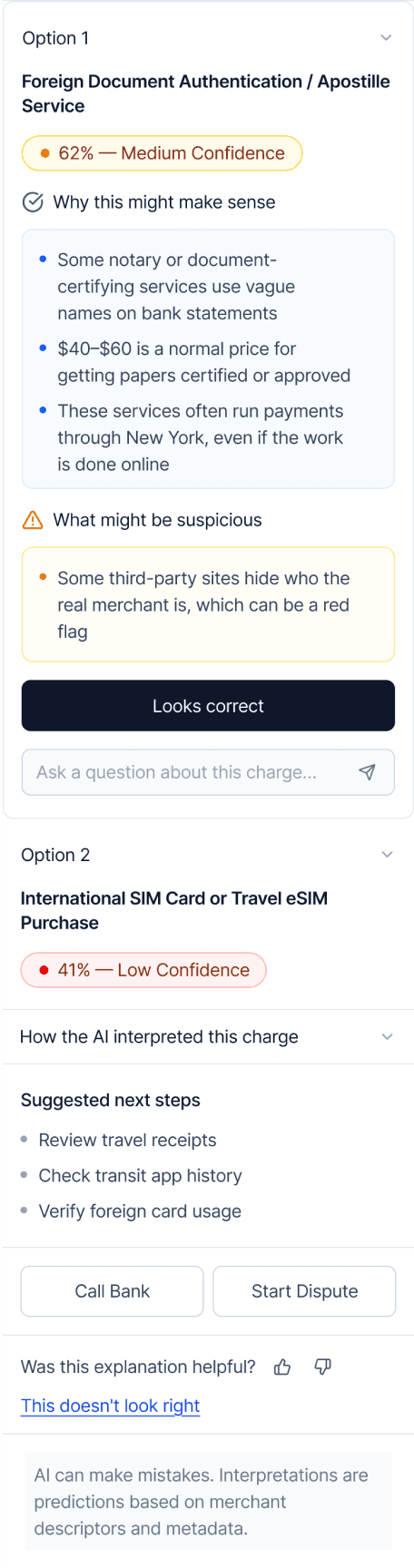
INSIGHT 1

Too Much Transparency Information Overwhelmed Users

I listed every data source and confidence score because I thought it would build trust. Instead, users felt overwhelmed and couldn’t find the actual answer they needed.

ADJUSTMENT 1

Reducing Anxiety by Prioritizing the Answer

I moved from a long list of raw data to a "synthesis" model. I removed the extra technical details and used simple checkmarks and plain language to explain the AI's logic.

INSIGHT 1

Too Much Transparency Information Overwhelmed Users

I listed every data source and confidence score because I thought it would build trust. Instead, users felt overwhelmed and couldn’t find the actual answer they needed.

ADJUSTMENT 1

Reducing Anxiety by Prioritizing the Answer

I moved from a long list of raw data to a "synthesis" model. I removed the extra technical details and used simple checkmarks and plain language to explain the AI's logic.

INSIGHT 2

Decision Tree Pattern Felt Rigid

If I got my answer, I wouldn’t even click on Looks Correct. I’d just leave.

The "Looks Correct" and "Not Sure" buttons interaction felt like a forced choice rather than a natural conversation.

ADJUSTMENT 2

Leading With Conversation, Not Confirmation

Removed rigid buttons keeping only the freeform text field. Added suggested questions to guide users on what they could ask without leaving them staring at a blank input field.

INSIGHT 2

Decision Tree Pattern Felt Rigid

If I got my answer, I wouldn’t even click on Looks Correct. I’d just leave.

The "Looks Correct" and "Not Sure" buttons interaction felt like a forced choice rather than a natural conversation.

ADJUSTMENT 2

Leading With Conversation, Not Confirmation

Removed rigid buttons keeping only the freeform text field. Added suggested questions to guide users on what they could ask without leaving them staring at a blank input field.

INSIGHT 3

AI Performance Rating Mechanisms Caused Confusion

Even optional feedback felt disruptive. Users couldn't tell the difference between "Looks Correct" (confirming the charge) and thumbs up/down (rating the AI).

ADJUSTMENT 3

Made Feedback Secondary and Unobtrusive

Consolidated all AI performance feedback into a clearly separated section at the bottom.

INSIGHT 3

AI Performance Rating Mechanisms Caused Confusion

Even optional feedback felt disruptive. Users couldn't tell the difference between "Looks Correct" (confirming the charge) and thumbs up/down (rating the AI).

ADJUSTMENT 3

Made Feedback Secondary and Unobtrusive

Consolidated all AI performance feedback into a clearly separated section at the bottom.

FINAL DESIGN

Scroll to View All Mocks

The Happy Path

STATEMENT PAGE

TRANSACTION DETAILS

LOADING STATE

THE HAPPY ANSWER

AI PERMISSIONS

STATEMENT PAGE

TRANSACTION DETAILS

LOADING STATE

THE HAPPY ANSWER

AI PERMISSIONS

Swipe to View All Mocks

The Happy Path

Swipe to View All Mocks

The Happy Path

The Alternate Routes

Scroll to View All Mocks

AI CLARIFICATION

USER ASKS SOMETHING

LOW CONFIDENCE

“I STILL DON’T REMEMBER”

USER REJECTS OUTPUT

Scroll to View All Mocks

The Alternate Routes

Swipe to View All Mocks

The Alternate Routes

Swipe to View All Mocks

The Alternate Routes

REFLECTION

What I Learned

The Concept of Silent Success

AI worked if users get their answer and leave without further interaction. Usage patterns and follow-up questions are better indicators of poor AI outputs.

Take the Flexibility Advantage That AI Offers

AI enables more natural, nuanced interactions instead of forcing users into predefined paths where it’s difficult to account for nuances.

Work shown with permission from respective companies.

© 2024 Hritika Dharaskar.

Create a free website with Framer, the website builder loved by startups, designers and agencies.